> For the complete documentation index, see [llms.txt](https://help.enterprise.ledger.com/llms.txt). Markdown versions of documentation pages are available by appending `.md` to page URLs; this page is available as [Markdown](https://help.enterprise.ledger.com/api-documentation/tutorials/first-steps-as-an-api-user/register-a-new-api-user.md).
# Register a new API User
Last updated 1 year ago
This guide will walk you through the steps to register a new API user on your ledger enterprise workspace, ensuring a secure and professional integration. Follow these detailed instructions to obtain the authentication keys needed to access Ledger Enterprise API seamlessly.
## Step 1: Generate API Operator Authentication Keys
Generate the API Operator keys pairs in hexadecimal output format using :
* **Elliptic curve**
* `SECP256R1`
* **Private key encoding**
* encoding `PEM`
* private format `TraditionalOpenSSL`
* **public key encoding**
* encoding `X962`
* private format `X9.62 Uncompressed Point`
To generate authentication keys in the required format you can get inspiration from the provided code samples:
*Python*
```python
from cryptography.hazmat.backends import default_backend
from cryptography.hazmat.primitives import serialization
from cryptography.hazmat.primitives.asymmetric import ec
def generate_keys():
private_key = ec.generate_private_key(ec.SECP256R1(), default_backend())
private_key_bytes = private_key.private_bytes(
encoding=serialization.Encoding.PEM,
format=serialization.PrivateFormat.TraditionalOpenSSL,
encryption_algorithm=serialization.NoEncryption(),
)
private_key_hex = private_key_bytes.hex()
public_key_bytes = private_key.public_key().public_bytes(
encoding=serialization.Encoding.X962,
format=serialization.PublicFormat.UncompressedPoint,
)
public_key_hex = public_key_bytes.hex()
return private_key_hex, public_key_hex
# Example of generated keys
private_key, public_key = generate_keys()
print(f"Private Key: {private_key}")
print(f"Public Key: {public_key}")
```
*Javascript*
```javascript
import { createECDH, generateKeyPairSync, createPublicKey } from 'crypto';
// Generate key pair synchronously
const { publicKey, privateKey } = generateKeyPairSync('ec', {
namedCurve: 'P-256', // This specifies secp256r1 curve
publicKeyEncoding: {
type: 'spki',
format: 'pem',
},
privateKeyEncoding: {
type: 'sec1', // Use sec1 format for OpenSSL
format: 'pem',
},
});
console.log('Private Key (PEM/SEC1):\n', privateKey);
console.log(publicKey);
function extractPublicKey(pemKey: string): Buffer {
// Convert the PEM formatted public key to raw public key in X9.62 uncompressed format
// This is an oversimplified method and may not work with different curves or PEM formats
const pem = pemKey.split('\n');
pem.shift(); // Remove the first line (BEGIN PUBLIC KEY)
pem.pop(); // Remove the last line (END PUBLIC KEY)
// Convert base64 to buffer
const keyBuffer = Buffer.from(pem.join(''), 'base64');
// Assuming the first 26 bytes are the header for the SPKI formatted key.
// The actual key should begin after this header.
const actualKeyBuffer = keyBuffer.slice(26);
// Further processing might be required if the keyBuffer includes additional metadata
return actualKeyBuffer;
}
const publicKeyVault = extractPublicKey(publicKey)
console.log(`Generated API User's public key: len = ${publicKeyVault.length} ${publicKeyVault.toString('hex')}`);
```
*Example Response:*
```
public key:
0475c227819ed7ed7e6c8a99c8b8fdebb75c3a9a0dd5f4b404e2dc66e5cc74b6f683c689fe5ba2b1081b5332f3c24790fd6bd35a6f670d123bca78f5b2cce1ea32
private key:
2d2d2d2d2d424547494e2045432050524956415445204b45592d2d2d2d2d0a4d4863434151454549444e34704b76595a7477474c432f5869554b64556a504a4a47545264314d5178564b73696157454159314f6f416f4743437147534d34390a417745486f555144516741456463496e675a37583758357369706e4975503372743177366d673356394c51453474786d3563783074766144786f6e2b57364b780a434274544d7650435235443961394e616232634e456a764b655057797a4f48714d673d3d0a2d2d2d2d2d454e442045432050524956415445204b45592d2d2d2d2d0a
```
{% hint style="warning" %}
Safeguard the private key, as it is critical for secure API access.
The following techniques exist to store your private key:
* store in file with correct permissions
* store in a Key Management System (most cloud providers have one)
* store in a secured vault
Storing the private key in a database is not recommended.
Monitoring accesses on the private key is recommended.
{% endhint %}
## Step 2: Register the API user on your workspace
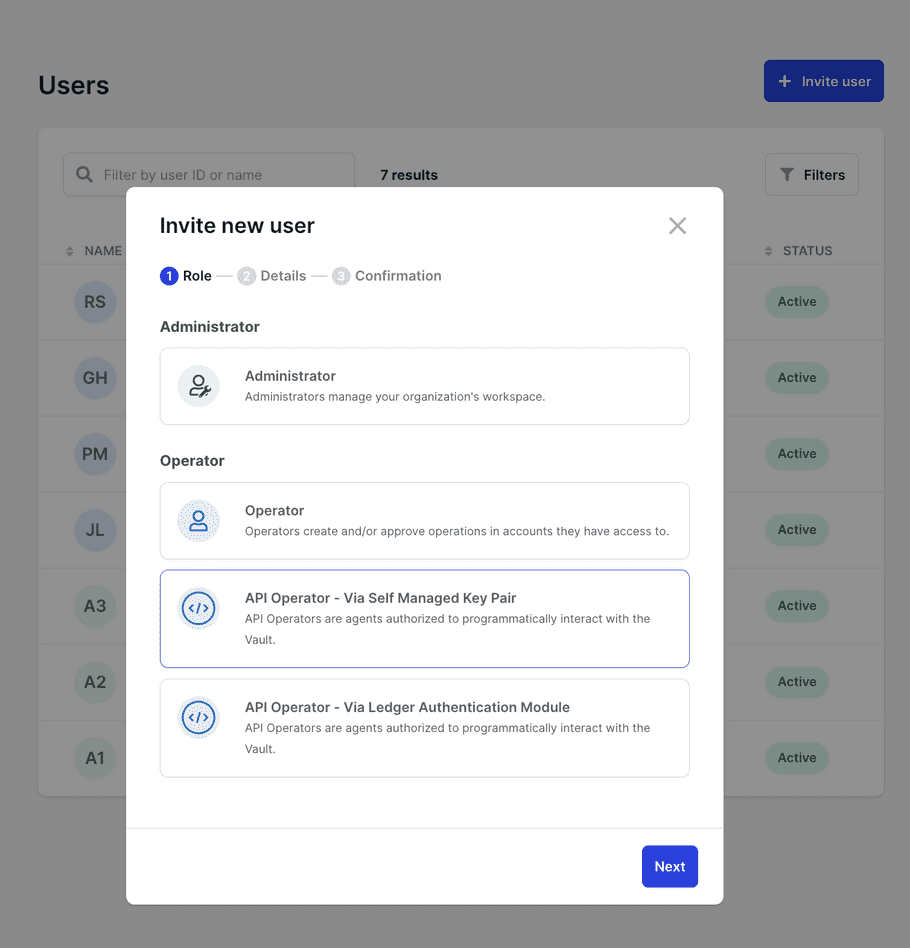
1. Log in as an Admin to your Ledger Enterprise workspace.
2. Navigate to the Users section and click "Invite User."
### Register an API Operator
1. Select "Operator - Via Self Managed Key Pair."
2. Enter the API username (e.g., demo *api* user) and the API user public key.
3. Confirm and seek approval from other Admins.
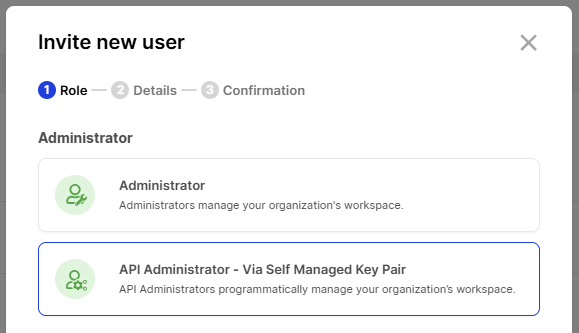
### Register an API Admin
1. Select "API Administrator - Via Self Managed Key Pair"
2. Enter the API username (e.g., "API Admin 1") and the API user public key.
3. Confirm and seek approval from other Admins.
{% hint style="warning" %}
An API Operator and an API Administrator perform similar functions on the API side. However, the governance rights granted to each from the workspace allow them to undertake different tasks.
{% endhint %}
## Step 3: Generate API Access for the new API user
The following steps are the same for an API Operator and an API Admin.
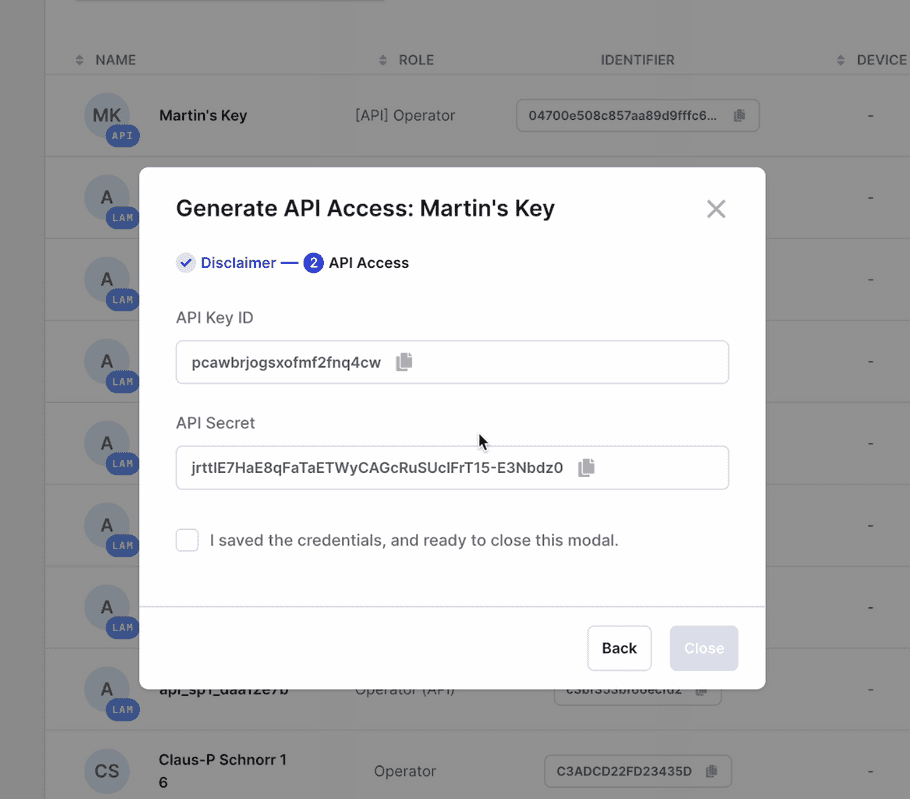
1. Visit the Users page and click "Generate API Access" next to the respective user. This action is one-time, but API secret regeneration is possible via user permission settings.
2. Copy the API Key ID and API Secret to a secure location, theses are the authentication credentials.
## Step 4: Assign the new API user to workspace rules
### API Operator
An API Operator can be assigned to workspace rules just like any other user.
* You can assign them to a user group.
* You can assign them directly to an account rules.
### API Administrator
Once fully registered, an API Administrator can only make read-only requests. A human administrator must grant them more rights so they can perform more tasks. For this, they should be assigned to an "Admin group".
1. Go to Settings > Admin rules.
2. In the table "API Admin rules", edit a rule to add the registered API Administrator to it.
3. Review and validate the request, it will then have to be reviewed by members of the Master Administration Rule.
Create account with policy
The API Administrator will be able to create accounts that using a policy (a set of rules that is common to multiple accounts). They will be able to make two types of requests:
* Create account with policy
* Approve a request to create an account with policy
## What's next?
Your API user is now ready to [take on their first steps](/api-documentation/tutorials/api-operator/first-steps-as-an-api-user.md).
---
# Agent Instructions
This documentation is published with GitBook. GitBook is the documentation platform designed so that both humans and AI agents can read, navigate, and reason over technical content effectively. Learn more at gitbook.com.
## Querying This Documentation
If you need additional information that is not directly available in this page, you can query the documentation by asking a question.
Perform an HTTP GET request on the following URL with the `ask` and `goal` query parameters:
```
GET https://help.enterprise.ledger.com/api-documentation/tutorials/first-steps-as-an-api-user/register-a-new-api-user.md?ask=&goal=
```
`ask` is the immediate question: it should be specific, self-contained, and written in natural language.
`goal` is what the user is ultimately trying to achieve, the reason they need the answer. Sharing it helps GitBook give you a better, more relevant answer. A goal is most helpful when it describes the outcome the user wants rather than restating the question. For example, with `ask=how do I create an API token`, a goal like `automate deployments from our CI pipeline` lets GitBook tailor the answer to that use case.
The response will contain a direct answer to the question and relevant excerpts and sources from the documentation.
Use this mechanism when the answer is not explicitly present in the current page, you need clarification or additional context, or you want to retrieve related documentation sections.